Actions
Bug #1750
open

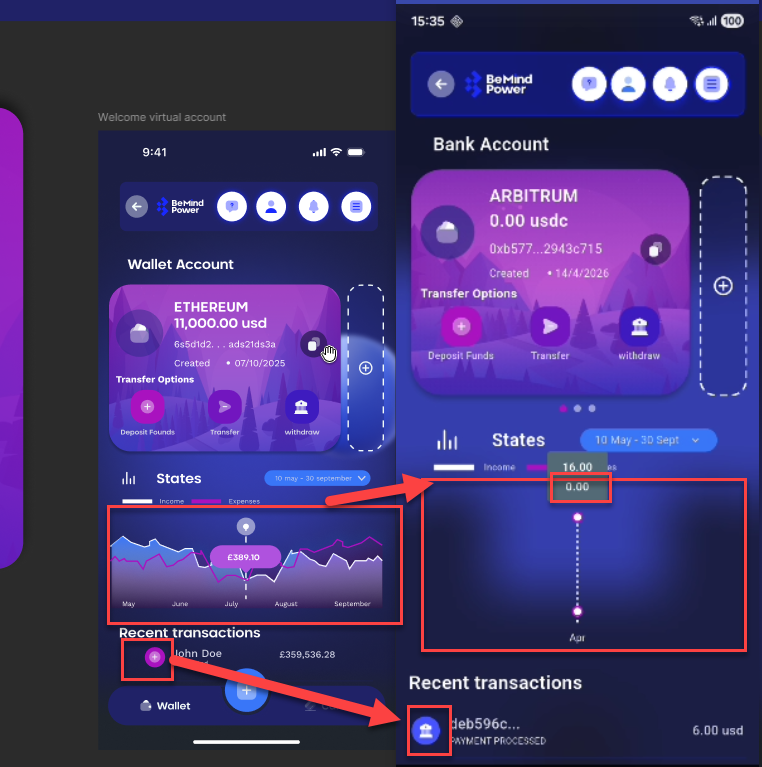
Chart not displaying correctly and incorrect transaction icons shown for all transaction types
Start date:
04/15/2026
Due date:
% Done:
0%
Estimated time:
Description
On the Wallet/Bank Account screen, the following issues are observed:
- The chart is not rendering properly (graph is missing/incorrectly displayed)
- In Recent Transactions, all transaction types (deposit, transfer, withdraw) are showing the same withdraw icon, instead of their respective icons
Steps to Reproduce
- Open Wallet/Bank Account screen
- Navigate to Stats/Chart section
- Observe chart display
- Scroll to Recent Transactions
- Check icons for different transaction types
Actual Result
- Chart is not visible or improperly displayed
- All transactions show withdraw icon only
Expected Result
- Chart should be properly rendered with data visualization
- Each transaction type should show correct icon:
- Deposit → Deposit icon
- Transfer → Transfer icon
- Withdraw → Withdraw icon
Files
No data to display
Actions